TP-Link VIGI - Best Security App for Modern Businesses
In today’s fast-paced business world, ensuring the safety and security of your enterprise is more important than ever. With technology advancing at a rapid pace, innovative solutions like the TP-Link VIGI App have emerged as a game-changer in business surveillance. Designed specifically for VIGI IP cameras and NVRs, this app provides a seamless way to monitor, manage, and secure your business assets from anywhere in the world. Whether you’re a small business owner or managing a large enterprise, the TP-Link VIGI App has the features and reliability you need to protect the business you’ve worked hard to build.
What is the TP-Link VIGI App?
The TP-Link VIGI App is an advanced mobile application designed to work exclusively with VIGI IP cameras and NVRs. It enables business owners to remotely monitor their premises, view live footage, review recorded videos, and receive instant alerts about potential security threats. The app’s intuitive interface and robust features make it a must-have tool for anyone looking to enhance their business security effortlessly.
Why Choose the TP-Link VIGI App for Your Business?
Security is a top priority for businesses of all sizes. Traditional security measures like guards and alarms, while useful, may not be enough to deter or respond to sophisticated threats. Here are some reasons why the TP-Link VIGI App is the ultimate choice for modern business surveillance:
1. 24/7 Monitoring
With the VIGI App, you can monitor your business around the clock. The app allows you to check your camera feed anytime, anywhere, ensuring peace of mind even when you’re away from your workplace.
2. Real-Time Alerts
Instant notifications are sent directly to your smartphone whenever the system detects motion or unusual activity. This real-time alert system ensures you can respond promptly to any potential threats.
3. Easy Setup and Configuration
Setting up a surveillance system has never been easier. The VIGI App provides step-by-step guidance, making it simple to add devices and configure settings without requiring technical expertise.
4. Smart Detection Features
The app’s smart detection capabilities—including motion detection, boundary alerts, activity zones, and obstruction alerts—allow you to customize your surveillance based on specific needs and scenarios.
5. Seamless Video Playback
Missed an important event? No problem. The VIGI App enables you to play back recorded videos instantly, ensuring you never miss critical moments.
6. Cloud Integration
With TP-Link VIGI Cloud Service, your data is securely stored and easily accessible. This integration allows you to manage your security footage and receive notifications even if your local storage is unavailable.
Key Features of the TP-Link VIGI App
The TP-Link VIGI App is packed with features designed to enhance your surveillance experience. Here’s a closer look at its standout capabilities:
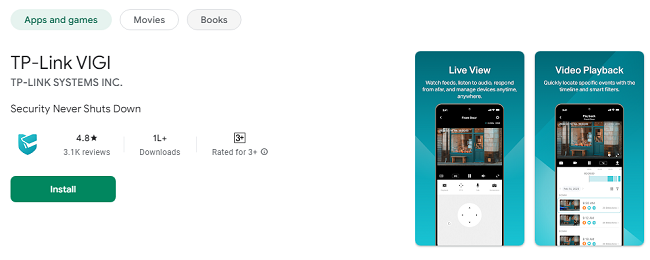
1. Live View and Video Playback
Live Streaming: Watch live footage of your business premises directly from your smartphone.
Video Playback: Revisit recorded videos to review past events and gain insights into any incidents.
2. Smart Detection and Notifications
Motion Detection: Receive alerts when movement is detected in monitored areas.
Boundary Alerts: Set virtual boundaries and get notified when they are breached.
Activity Zones: Focus on specific areas by setting up customized activity zones.
Obstruction Alerts: Stay informed if an object blocks your camera’s view.
3. User-Friendly Interface
Intuitive design ensures that anyone can navigate the app with ease.
Customizable settings allow you to tailor the app’s functionality to suit your specific requirements.
4. Secure Cloud Storage
Safeguard your videos with TP-Link’s reliable cloud service.
Access your data anytime, even if your physical storage devices are compromised.
5. Multi-Device Support
Manage multiple cameras and NVRs from a single app.
Ideal for businesses with multiple locations or large facilities.
How to Get Started with the TP-Link VIGI App?
Getting started with the TP-Link VIGI App is straightforward. Follow these simple steps to set up and begin using the app:
#1 Download the App
The TP-Link VIGI App is available for free on both the Apple App Store and Google Play Store. Search for “TP-Link VIGI” and download the app to your smartphone or tablet.
#2 Create an Account
Open the app and create a new account using your email address. This account will be used to manage your devices and access your security footage.
#3 Add Your Devices
Follow the app’s step-by-step instructions to add your VIGI IP cameras and NVRs. Ensure that your devices are connected to the internet for seamless integration.
#4 Configure Settings
Customize your settings, such as motion detection sensitivity, activity zones, and notification preferences, to suit your business needs.
#5 Start Monitoring
Once your devices are set up, you can start monitoring your business premises in real-time.
Benefits of Using the TP-Link VIGI App
1. Enhanced Security
The app’s advanced features ensure that your business remains protected against threats. From real-time alerts to intelligent detection, the VIGI App provides comprehensive security coverage.
2. Convenience and Accessibility
Access your surveillance system anytime, anywhere, from the convenience of your smartphone. This flexibility allows you to stay connected to your business, even when you’re on the go.
3. Cost-Effective Solution
By integrating cloud storage and smart detection features, the TP-Link VIGI App reduces the need for expensive hardware and dedicated security personnel.
4. Peace of Mind
Knowing that your business is under constant surveillance provides peace of mind, allowing you to focus on growth and operations without worrying about security.
Applications of the TP-Link VIGI App
The TP-Link VIGI App is versatile and can be used in various business environments, including:
1. Retail Stores
Monitor customer activity, prevent theft, and ensure the safety of employees.
2. Offices
Keep an eye on office premises, monitor attendance, and protect sensitive information.
3. Warehouses
Secure inventory and track unauthorized access to storage areas.
4. Hospitality Businesses
Ensure the safety of guests and staff in hotels, restaurants, and resorts.
5. Educational Institutions
Protect students, staff, and assets in schools, colleges, and universities.
Tips for Maximizing the TP-Link VIGI App
To get the most out of the TP-Link VIGI App, consider these tips:
1. Regularly Update the App
Keep your app updated to access the latest features and security enhancements.
2. Optimize Camera Placement
Position your cameras strategically to cover key areas and eliminate blind spots.
3. Review Footage Regularly
Periodically review recorded videos to identify patterns and improve security measures.
4. Customize Notifications
Adjust notification settings to avoid unnecessary alerts and focus on critical events.
5. Leverage Cloud Storage
Use TP-Link VIGI Cloud Service to back up your data securely and access it from anywhere.
Frequently Asked Questions (FAQs)
1. What devices are compatible with the TP-Link VIGI App?
The app works exclusively with VIGI IP cameras and NVRs.
2. Is the TP-Link VIGI App free to use?
Yes, the app is free to download and use. Some features may require additional subscriptions for cloud storage.
3. Can I use the app on multiple devices?
Yes, you can install the app on multiple smartphones or tablets and manage your account from any device.
4. How secure is my data on the VIGI App?
The app uses encrypted communication and cloud storage to ensure your data is safe and secure.
5. Can I receive alerts for specific events?
Yes, the app lets you customize notifications for motion detection, boundary breaches, and other specific triggers.
6. Do I need technical expertise to set up the app?
No, the app provides step-by-step guidance, making it easy for anyone to set up and use.
7. What happens if my internet connection goes down?
The app’s cloud service ensures data is saved and accessible once the connection is restored.
Conclusion
The TP-Link VIGI App is more than just a surveillance tool; it’s a comprehensive solution designed to protect your business and give you peace of mind. Its intuitive interface, advanced features, and seamless integration with VIGI IP cameras and NVRs make it an invaluable asset for business owners. Whether you’re monitoring a single location or managing multiple premises, the TP-Link VIGI App ensures that your business remains safe and secure at all times.
Take control of your business security today with the TP-Link VIGI App. Download it now and experience the difference it can make in safeguarding your hard-earned success.
Updates